Turn live-site tickets into shipped work.
OkFlow lets agencies and product teams pin feedback to any page, convert it into tracked work, and sync into Jira, Linear, ClickUp, and GitHub, without screenshot sprawl.
Use the widget on your site, the browser extension on any site, or share review links with clients.
Website feedback falls apart the moment it leaves the page.
Screenshots get lost in chat. Tickets miss the exact context. Stakeholders describe the same issue three different ways. By the time engineering sees the work, the original feedback has already been diluted.
From feedback to follow-through.
Capture on the page
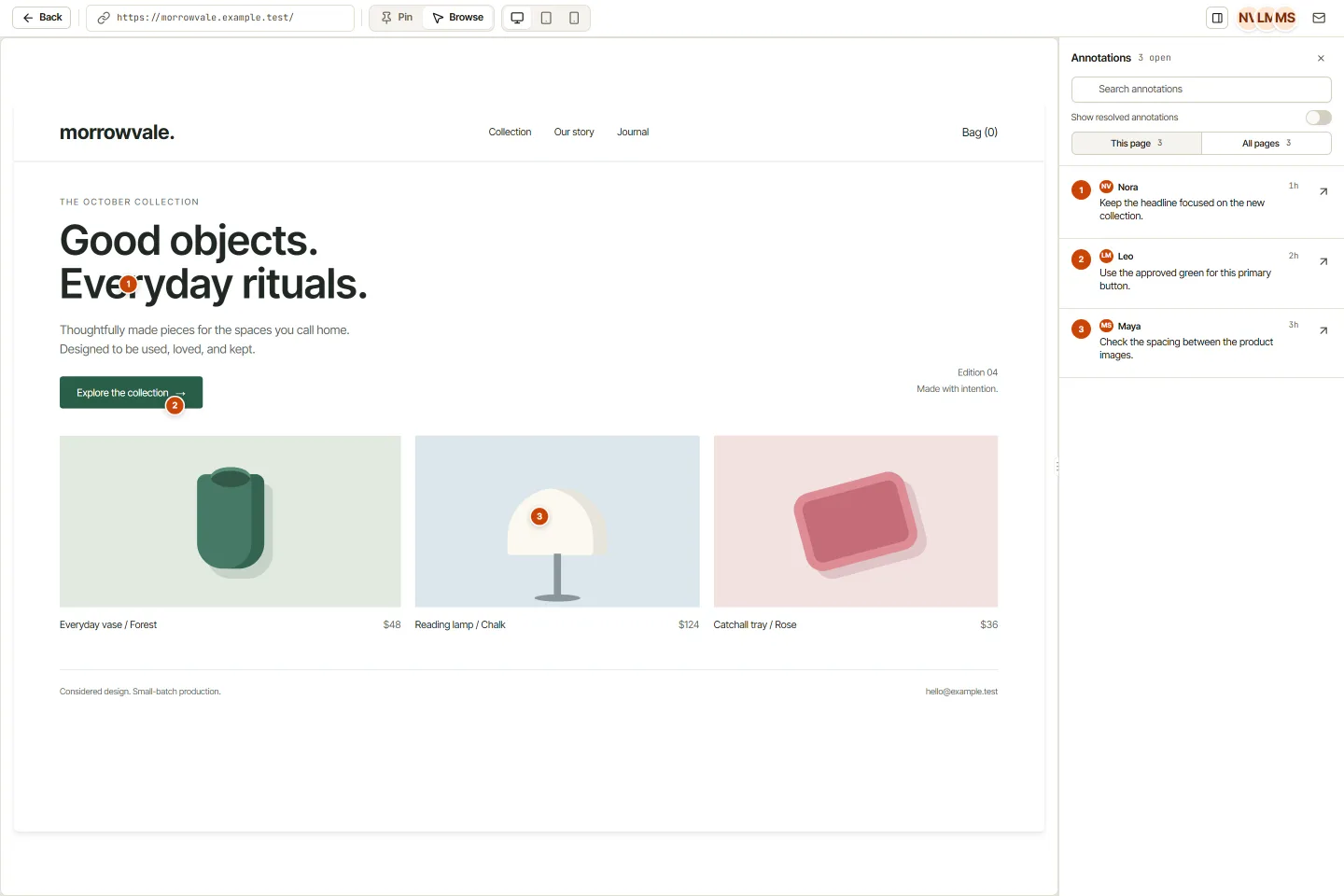
Pin feedback to live websites and web apps with boxes, arrows, screenshots, and full browser context.
Turn comments into work
Convert visual feedback into tracked tasks with structured titles, priorities, tags, and owners.
Sync your existing stack
Push updates into Jira, Linear, ClickUp, GitHub, and Zapier instead of rebuilding your process.
Close the loop faster
Dashboards, reporting, and AI-assisted fix workflows move review to resolution without losing context.
Pin precise feedback to any page.
Use OkFlow as an embedded widget on sites you control, or as a browser extension on any site. Reviewers leave clear, location-specific feedback with the surrounding page intact.
- โ Pin comments to exact UI locations
- โ Add boxes and arrows for clearer review
- โ Capture screenshots and browser metadata
- โ Support guest review and shareable links
Messy feedback, organized delivery.
OkFlow turns raw comments into actionable work. Instead of copying notes from screenshots into tickets by hand, your team creates tasks immediately and tracks them across list, board, calendar, sprint, and timeline views.
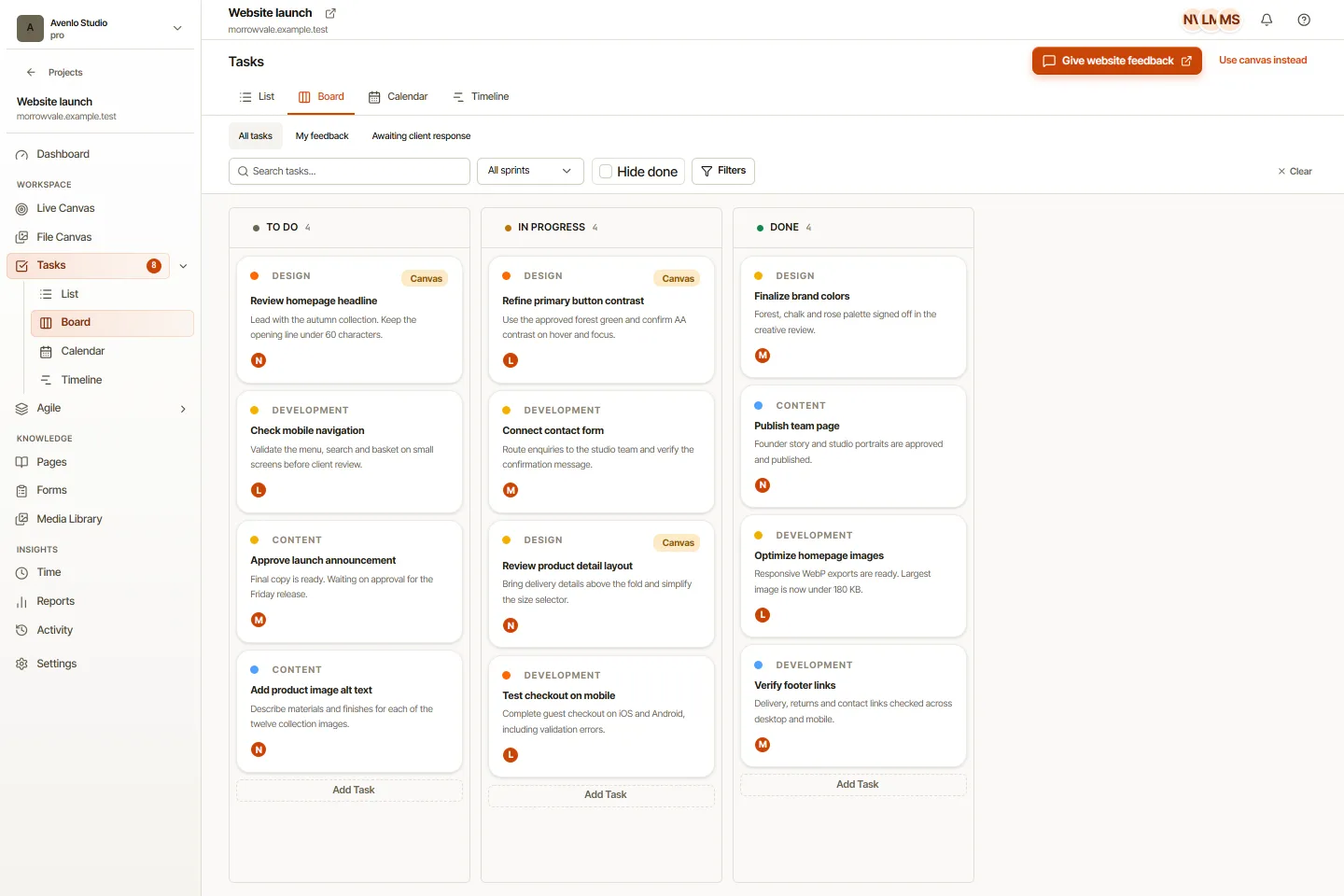
- โ Create tasks directly from annotations
- โ AI-suggested titles, priorities, and tags
- โ List, board, calendar, sprint, timeline
- โ Review context stays connected to execution
Plug into the stack you already run.
OkFlow fits the flow instead of forcing a replacement. If you'd rather operate inside one tool, task management and time tracking are built in.
- โ Two-way native sync with project trackers
- โ Code-aware integrations for engineering
- โ Glue + custom integrations for everything else
- โ Reduce duplicate entry and status drift
Built for real website review conditions.
Some sites block iframe embedding. OkFlow doesn't stop there. The browser extension is the most reliable review surface, the widget covers owned sites, and share links cover everyone else.
blocked
Teams that ship customer-facing web experiences.
For agencies
Collect client feedback, reduce revision chaos, keep delivery moving without screenshot sprawl.
See agency workflowFor product teams
Centralize design review, QA, and issue triage across product, design, QA, and engineering.
See product team workflowFor marketing teams
Review landing pages, campaigns, and website changes directly on the live experience pre-launch.
See marketing workflowThree steps to a cleaner review loop.
Open the site
Reviewers leave feedback in context: pin, box, screenshot.
Convert to tracked work
Annotations become tasks with priorities, tags, and assignees.
Sync, report, resolve
Updates flow into your stack and back. No context lost on the way.
Start free. Upgrade when collaboration gets serious.
Begin with 1 project and 3 users, then expand into integrations, reporting, task management, and time tracking.
Things teams ask before they switch.
Do I need to install code on every site?
No. The browser extension works on any site. The widget is for sites you control.
What if a site blocks iframe embedding?
Use the browser extension. OkFlow has an extension-first fallback for blocked sites.
Can clients leave feedback without an account?
Yes. Guest access and share links let reviewers comment without becoming workspace users.
Can OkFlow work with our existing task stack?
Yes. Two-way sync with Jira, Linear, ClickUp, GitHub, and Zapier is native.
Does OkFlow include task management and time tracking?
Yes. Visual feedback is the wedge, but tasks, sprints, calendar, and time tracking are built in.
Do you support WordPress?
Yes. The OkFlow WordPress plugin handles widget deployment on WP properties.
Stop losing website feedback in screenshots and side conversations.
Capture feedback where it happens, turn it into tracked work, ship faster with less handoff friction.